Live Captions & Translation for Events and Meetings
Captioning software for your event, seminar, church
Captions appear on screens and attendees' phones less than a second after the speaker says them, in 50+ languages. Your device becomes an offline AI captioning server for the whole room. ADA, ACA & EAA ready.
Free plan available · 15-second setup · No venue internet line to rent · No app for attendees
Trusted by AV teams at conferences, organizations & churches
















Your device becomes the AI captioning server
Install ConferenceCaptioning on your device and it transcribes and translates speech on the device itself, using Apple's Neural Engine or Windows GPU+NPU for the best performance. Every screen on the same local network shows broadcast-quality captions, with no internet anywhere in the chain and no captioning hardware to buy or rent.
The AI runs on your device, not in a data center. Most captioning tools send every word your speakers say to remote servers. Here, speech is transcribed and translated on the machine in the room, and the audio is never uploaded, stored, or used to train AI.
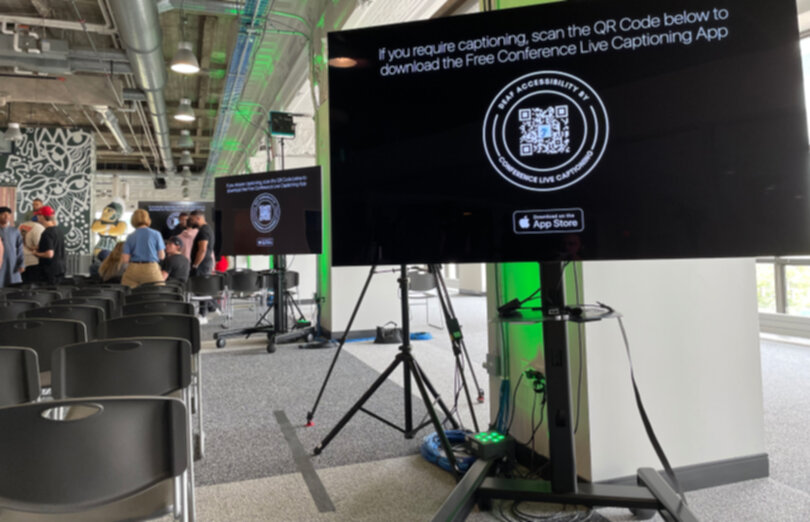
Attendees can follow on their own phones too: share a QR code to a public link and they read along over their mobile data, with nothing to join or install. Prefer to stay fully offline? They can join the same local Wi-Fi instead.
- Microphone or sound boardYour existing audio via USB, XLR interface, Dante, or NDI
- Your deviceRuns the AI: live transcription plus up to 5 translations
- The room's local networkNo internet connection needed
- Stage screens, TVs & confidence monitorsBroadcast-quality captions in each screen's language
From the speaker's mouth to every screen
Watch ConferenceCaptioning caption a live speaker and translate into other languages in real time, with no internet connection. Words reach the screen in under a second, so captions keep pace with the speaker instead of trailing a sentence behind.
Cloud captioning adds delay every time audio travels to a data center and back. Here, the AI runs on the device in the room.
Measured in the open
We streamed a real NASA news conference through our on-device engines at real-time speed and scored the captions against a corrected transcript. The method, the data and the scoring script are public, so you can check every number or run your own engine on the same clip.
Read the live captioning accuracy benchmark → Read the live translation speed benchmark →Why teams switch to ConferenceCaptioning
Faster than human CART, a fraction of the cost
📋 Effortless ADA, ACA, EAA Compliance
💸 Upsell to clients
👌 Zero extra tech hassle
Features
Professional Live CART (Communication Access Real-Time Translation) Services for Events & Meetings
📲 Subtitles
⚙️ Customizations
🗺️ Translations
🤝 Networking & User input
Solutions Built for Your Stage
Churches & Non-Profits
What Customers Say
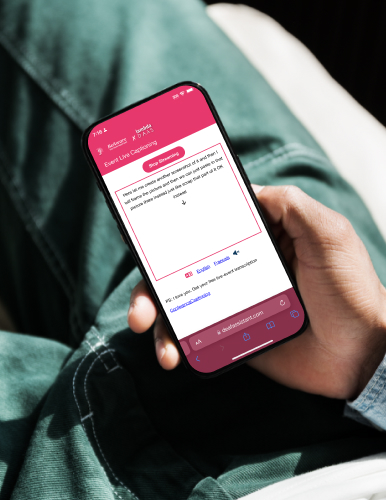
Here's how easy it is
- Step 1
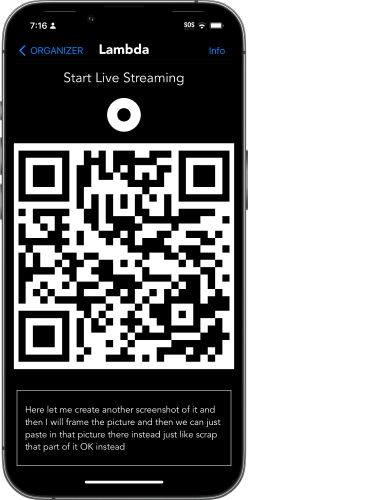
- Organizers use the app to generate a QR code & press a button to capture audio
- Step 2
- Attendees scan the QR code and tap on Get Live Captions to see live transcription in browser
- Step 3
- Sip a Piña Colada. No stress. No worries
Supporting Accessibility & Inclusion Worldwide
- Live transcription for events
- Attendee & Organizer access
- 15-second 3-tap setup to use
- 20-minute limit per stream
- Supports 20+ languages
- Virtual Dante, USB, XLR Support
- 16 freely available streams
- Premium streaming servers
- Provide a unique event name
- Attendees don't need an app
- Customized branding for you
- No streaming time-limit
- Obscene Text Filtering
- Discount available for Non-profits
- 7 day trial & Technical Support
- World's Fastest Multilingual Live translations
- Usage reports at the end of events
- Make events secret & secure
- Completely disconnected from the public internet
- Multi-System Automatic Failover
- Additional customizations & bulk pricing
- API Access & Live event support
- Live transcription for events
- Attendee & Organizer access
- 15-second 3-tap setup to use
- 20-minute limit per stream
- Supports 20+ languages
- Virtual Dante, USB, XLR Support
- 16 freely available streams
- Premium streaming servers
- Provide a unique event name
- Attendees use a webpage
- Customized branding for you
- No streaming time-limit
- Discount available for Non-profits
- 7 day trial & Technical Support
- World's Fastest Multilingual Live translations
- Usage reports at the end of events
- Make events secret & secure
- Completely disconnected from the public internet
- Multi-System Automatic Failover
- Additional customizations & bulk pricing
- API Access & Live event support
Frequently asked questions
What is ConferenceCaptioning?
ConferenceCaptioning is live captioning and real-time translation software for in-person conferences, events, meetings, seminars, and church services. It turns a speaker's audio into captions on stage screens and on attendees' own phones, with translation into 50+ languages. It is built by the team behind the BeAware Deaf Assistant app.
Does it work on Windows, or only on Apple devices?
Both. The native app runs on Mac, iPad, and iPhone and performs best there, because it uses Apple's Neural Engine for on-device AI. On Windows, or any computer with Google Chrome, the ConferenceCaptioning Chrome extension runs speech recognition on-device too, and works offline once its speech model is downloaded. Hot-failover redundancy currently requires Apple devices.
Can I use it for in-person meetings and town halls?
Yes. Beyond conferences, teams use it for board meetings, all-hands, town halls, trainings, and hybrid sessions. Connect the room's microphone or sound system to the host computer, and attendees follow live captions or translations on the room screen or their own phones by scanning a QR code.
How fast are the live captions?
Captions typically appear in under one second (sub-1000 ms) from the moment words are spoken. That's fast enough to use as on-stage captions without the text visibly lagging behind the speaker.
Do attendees need to download an app?
No. Attendees scan a QR code displayed at the venue and read live captions or translations in their phone's web browser. There's no app, no account, and no email required.
Does it really work with no internet at all?
Yes. Installing ConferenceCaptioning turns a Mac, iPad, or iPhone, or a Windows PC through our Chrome extension, into an AI captioning and translation server, so transcription, translation, and captions on every screen connected to the same local network run with no internet at all, even in a fully air-gapped setup. Attendees usually read along on their own phones through a QR code to a public link, which uses their mobile data so they don't have to join anything. They can also join the local Wi-Fi to stay fully offline.
Do I need to order a hardwired internet line from the venue?
No. ConferenceCaptioning runs transcription and translation on-device, so there's no dedicated internet line, wired drop, or reserved bandwidth to rent from the venue. Venue internet lines can be a significant line item per room, so skipping them is often one of the biggest savings compared with cloud captioning tools.
How many languages can it translate into?
You can choose from a pool of 50+ languages and run up to 5 translations at the same time. Each attendee picks the language they want to read.
Is it ADA compliant?
ConferenceCaptioning provides the real-time captioning and post-event transcripts that events use to meet accessibility requirements under the ADA (Americans with Disabilities Act), the ACA (Accessible Canada Act), and the EAA (European Accessibility Act).
How much does it cost compared to human CART captioning?
There's a free plan to get started. The Standard plan is $100 per day for smaller events or $400 per month billed annually, with no streaming time limit. Enterprise pricing is available on request. Human CART captioners typically charge $150–$300 per hour plus booking minimums, and they don't include multilingual translation.
Does it integrate with OBS, vMix, ProPresenter, or a video switcher?
Yes. The caption feed can be added as a browser source in OBS Studio, vMix, ProPresenter, and H2R Graphics, including a chroma-key background for transparent lower-third overlays. Audio comes in from your existing sound board via USB, XLR interface, Dante, or NDI.
Can I control captions from a Stream Deck or Bitfocus Companion?
Yes. AV teams can start, stop, show, and hide captions and translations on screen from an Elgato Stream Deck or Bitfocus Companion, so the operator never has to walk back to the captioning computer mid-show.
What happens if the captioning computer fails mid-event?
A backup Mac or iPad on the same local network takes over automatically. The caption display checks the primary every 500 milliseconds, and after the number of missed checks you choose (4 by default), captions switch to the backup in as little as half a second, or about two seconds at the default setting, with no page refresh, while an alert email goes to your AV lead. Hot failover is included in the Enterprise plan. See the hot-failover setup guide.
Is my event's audio sent to a data center or used to train AI?
No. The AI runs on your device, not in a data center: speech is transcribed and translated on the machine in the room, and the audio is never uploaded, stored, or used to train AI. Most cloud captioning tools send every word to remote servers. Transcripts are saved to the cloud only if the organizer chooses to.
Contact
Call or Visit us during regular business hours